
Thumbium Review: Can One Prompt Really Replace Your Thumbnail Designer?
Thumbium Review: Your thumbnail decides whether someone clicks or scrolls past — no matter how good the video is. I put Thumbium's prompt-to-thumbnail engine under the microscope: what it actually does, what it costs on every plan, and whether the one-time price is worth it before you check out.
Quick Verdict
| Field | Value |
|---|---|
| Our Rating | (4.2/5) |
| Best For | YouTubers, Shorts creators, and channel managers who want scroll-stopping thumbnails without design skills |
| Starting Price | $17 one-time (Hobby plan, launch pricing) |
| Free Trial | No |
| Money-Back | 14-day guarantee |
| Verdict | Worth Buying — Especially If You're Tired Of Paying A Designer Or A Monthly Subscription |
That 4.2 isn't a perfect score. Thumbium's core idea — type a prompt, get a finished, on-brand thumbnail in minutes, running on your own OpenAI key instead of a monthly bill — is a genuinely different pricing model from most AI thumbnail tools. But there's a monthly credit cap you should know about before you check out, and this review breaks down exactly what you get on every tier.
👉 Get Thumbium — Starting At $17 →What Is Thumbium?
Thumbium is a prompt-to-thumbnail generator built for YouTube and Shorts creators who feel the same daily bottleneck: the video is finished, but the thumbnail is what decides whether anyone actually watches it. You describe what you want in plain English — who to feature, what background, what style — and Thumbium turns that into a finished, click-ready thumbnail sized correctly for 16:9 YouTube covers or 9:16 Shorts covers.
The part that stands out is how it's priced: instead of a monthly subscription with credits you buy from the app maker, Thumbium runs on your own OpenAI API key. You pay Thumbium once for the software, then pay OpenAI directly — usually just a few cents per image — for what you actually generate.
Quick Overview

| Detail | Info |
|---|---|
| Product Name | Thumbium |
| Best For | YouTubers, Shorts creators, channel managers, agencies |
| Platform | Web (cloud-based) |
| Main Benefit | Turns a text prompt into a finished, click-ready thumbnail in minutes — no design skills needed |
| Ease of Use | Easy — six guided steps, no Photoshop or design software required |
| Starting Price | $17 one-time (Hobby plan, launch pricing) |
| Ongoing Cost | $0.04–$0.16 per thumbnail, paid directly to OpenAI |
| Money-Back Guarantee | 14 days |
Why I Looked Into Thumbium
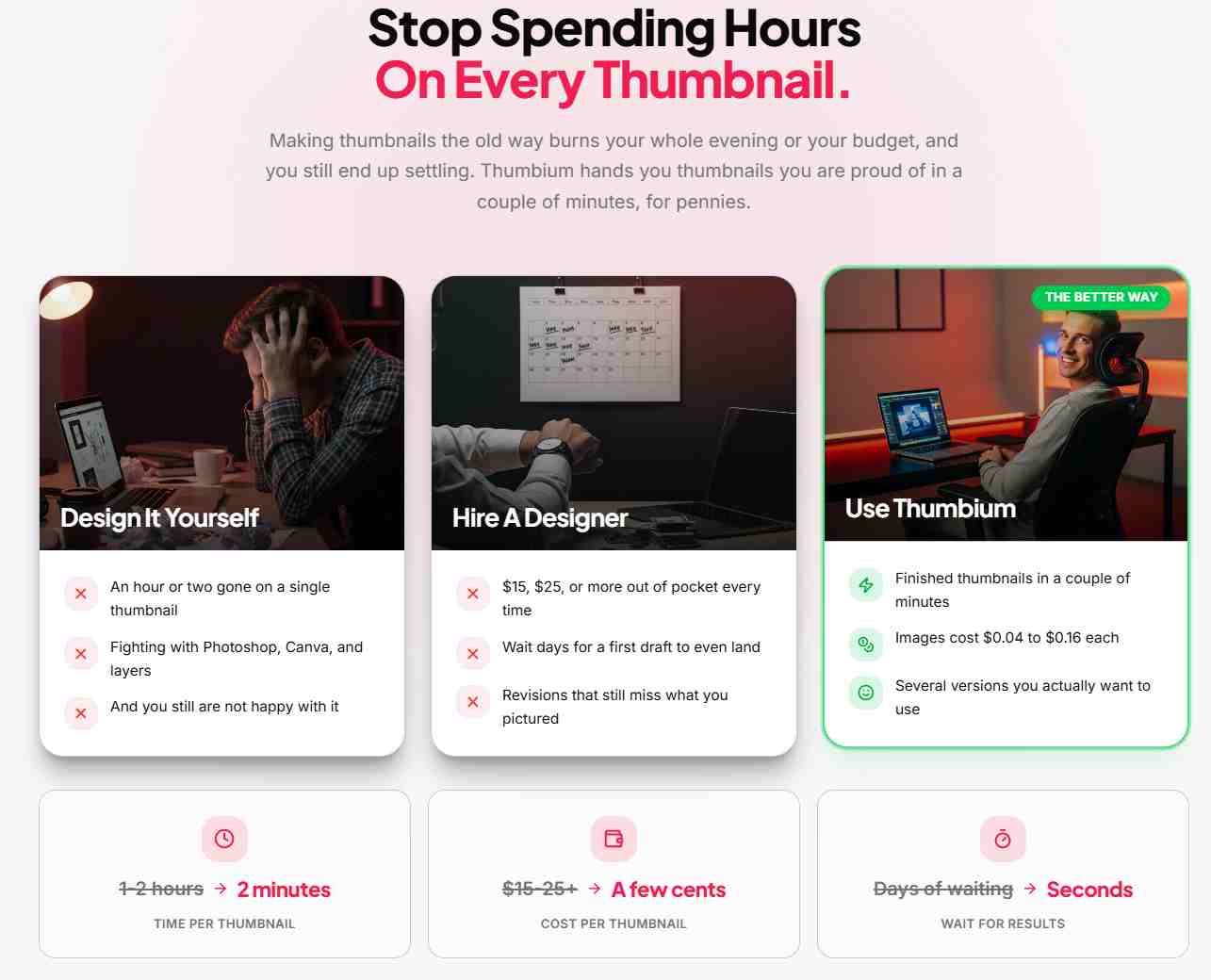
If you've ever spent an hour fighting with Canva or Photoshop just to get one thumbnail you're not embarrassed to publish, you already know the problem. Hire a designer instead, and you're paying $15–$25+ per thumbnail and waiting days for a first draft that still might miss what you pictured.
I wanted to see whether Thumbium's "prompt in, finished thumbnail out" claim actually held up, and whether running on your own OpenAI key was as painless as the sales page made it sound — because that's the part that's easy to promise and easy to get wrong.

How It Works
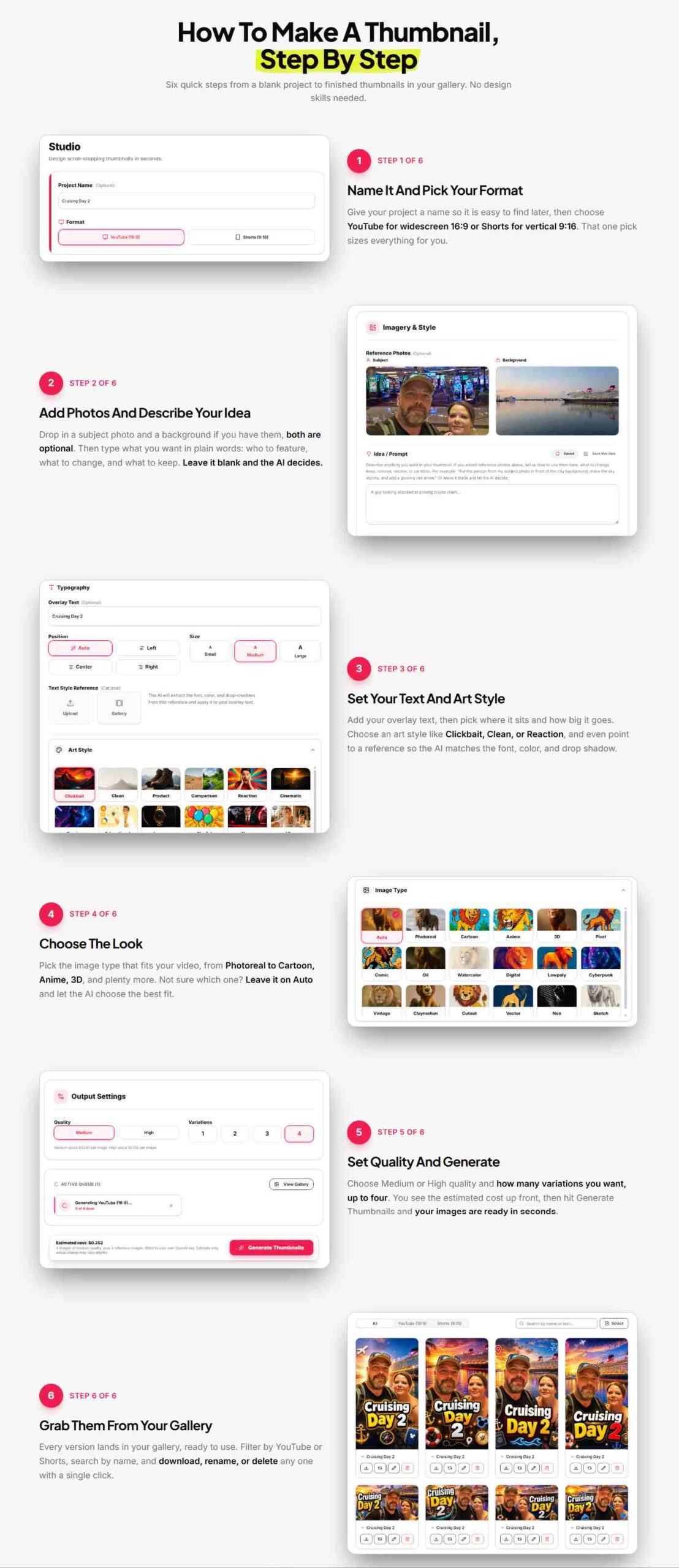
Thumbium's workflow runs in six guided steps, from a blank project to finished thumbnails sitting in your gallery:
- Name it and pick your format — name the project, then choose YouTube (16:9) or Shorts (9:16).
- Add photos and describe your idea — optionally drop in a subject photo and background, then type your idea in plain words.
- Set your text and art style — add overlay text, choose its position and size, and pick an art style like Clickbait, Clean, or Reaction.
- Choose the look — pick an image type (Photoreal, Cartoon, Anime, 3D, and more), or leave it on Auto.
- Set quality and generate — choose Medium or High quality and up to four variations, see the estimated cost, then generate.
- Grab them from your gallery — every version lands in your gallery, ready to filter, download, rename, or delete.
You can also edit any finished thumbnail later just by typing what you want changed — swap the sky, the outfit, the expression, or the background — and the AI redoes the image while keeping everything else in place.
See It In Action
Rather than take the sales page's word for it, watch the full walkthrough of a thumbnail going from a single prompt to a finished, downloadable cover.
▶ Watch The Demo & Get ThumbiumKey Features
Prompt-To-Thumbnail Core
Describe your idea in plain words and get a finished thumbnail back in minutes — no design skills, no Photoshop, no stock-photo sites.
Reference Photos & Face Swapping
Upload your own face or a product shot and Thumbium builds the scene around it, cutting out the background automatically and blending it into a new setting.
Both Formats, One Prompt
Every project is sized correctly for both YouTube's 16:9 covers and Shorts' 9:16 covers from the same idea.
Style Presets
Pick a look built for clicks — Clickbait, Clean, Reaction, and more — or point to a reference image so the AI matches the font, color, and drop shadow.
Up To 4 Versions Per Request
Generate several takes at once and keep the one that pops, instead of committing to a single result.
Edit With AI
Change the sky, clothes, colors, background, or expression later just by typing the change — everything else in the image stays the same.
Benefits — Why People Choose It
No more hours lost to design software
What used to eat an hour or two fighting with layers and fonts now takes a couple of minutes from prompt to finished thumbnail.
No more paying $15–$25+ per thumbnail
Because it runs on your own OpenAI key, each thumbnail costs roughly $0.04 to $0.16 instead of a designer's flat fee.
No recurring bill
You pay Thumbium once. There's no monthly subscription and no credit packs to keep buying from the app itself.
A more consistent channel look
Style presets and reference-matching make it easier to keep every thumbnail feeling like it belongs to the same channel.
Real Use Cases
Solo YouTubers
Get a finished thumbnail the moment a video is edited, without switching to a separate design tool.
Shorts Creators
Generate a matching 9:16 cover from the same prompt used for the long-form upload.
Channel Managers & Agencies
Turn around thumbnails for multiple client channels without billing a designer for every single cover.
Reviewers & Unboxers
Drop in a real product shot and place it in any scene — useful for review, unboxing, and comparison videos.
👉 Get Thumbium — Starting At $17 →Pros and Cons
✅ What Worked Well
- Finished thumbnails in a couple of minutes instead of an hour-plus of manual design
- Runs on your own OpenAI key — pennies per image instead of a monthly app subscription
- Up to four variations per request, so you can compare before choosing
- Face/product reference photos let you put yourself or your product directly in the scene
- Type-to-edit lets you change one detail without redoing the whole image
- One-time payment on the front end, not a forced recurring charge
⚠️ What To Know First
- Each plan has a monthly thumbnail cap (50 / 100 / 250) that resets monthly rather than being unlimited
- You still need your own OpenAI API key and account, which is an extra (if quick) setup step
- Thumbnails are stored in your gallery for only 30 days, so you need to download the ones you want to keep
- Brand-new launch — no long independent track record yet
What I Didn't Like
The monthly credit cap matters more than the sales page emphasizes — 50 thumbnails a month on the Hobby plan sounds like plenty until you're testing four variations per idea, which burns through credits faster than a single-image tool would.
Because this is a brand-new launch, there's no independent, non-affiliate track record yet. This review is based on the vendor's own demo and published materials.
Target Audiences & Market Potential
- Solo creators: a fast, cheap replacement for hours in Canva or Photoshop.
- Growing channels: a way to test more thumbnail variations per video without the cost of a designer for each one.
- Agencies and channel managers: a way to produce covers across multiple channels without a per-thumbnail design fee eating into margin.
- Anyone already paying monthly for an AI thumbnail tool: a one-time-payment alternative worth comparing on cost over a year.
Comparison Table
| Category | Many Other AI Thumbnail Tools | Thumbium |
|---|---|---|
| Pricing | Monthly subscription | One-time payment |
| Artwork | Generic templates | Original artwork every prompt |
| Options per prompt | One image | Up to four variations |
| Reference photos | Not supported | Upload your own face or product |
| Styles | Fixed presets | Custom styles and looks |
| Editing software needed | Photoshop still needed | None |
Based on features commonly found in paid AI thumbnail tools, per Thumbium's own published comparison. Exact terms vary by tool.
Alternatives — Other Tools to Consider
Manual design (Canva / Photoshop)
Full creative control, but an hour or two per thumbnail and a learning curve if you're not already comfortable with design software.
Hiring a freelance designer
Consistent quality, but $15–$25+ per thumbnail and a multi-day wait for a first draft.
Subscription-based AI thumbnail generators
Similar prompt-to-image concept, but typically billed monthly regardless of how many thumbnails you actually make that month.
Pricing Plans & OTO Breakdown
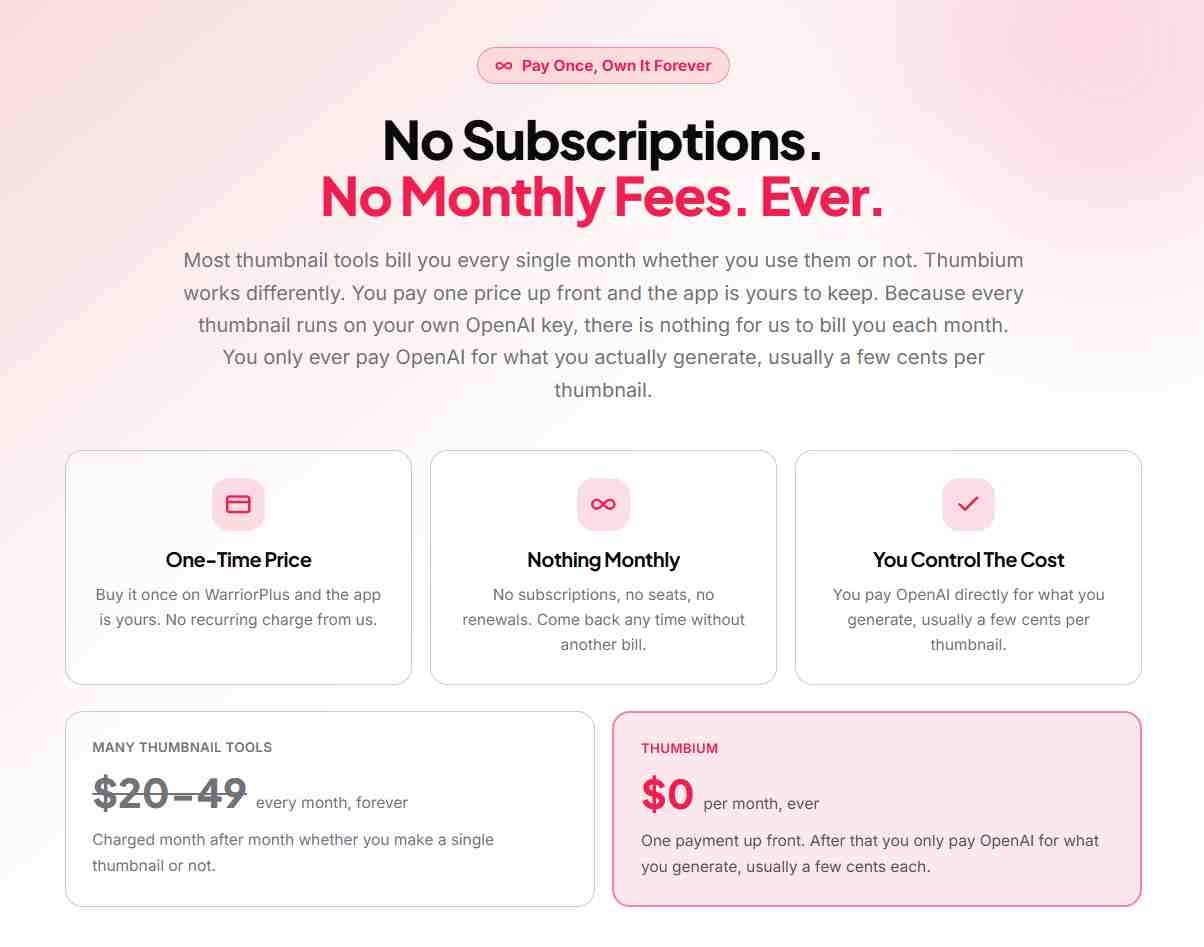
Thumbium's pricing is tiered and published upfront — here's every option broken down so you know exactly what you're choosing at checkout:
🟢 Hobby Plan
$1750 thumbnails a month, resetting every month, for creators posting a few videos a month who want covers that actually get clicked. YouTube and Shorts formats included, runs on your own OpenAI key.
🚀 Business Plan (Most Popular)
$29100 thumbnails a month, resetting every month, for regular uploaders who want room to test styles on every video before publishing.
🏢 Agency Plan
$49250 thumbnails a month, resetting every month, built for agencies and channels running at volume that need a steady batch of covers every month.
All three plans are one-time payments — buying more than one on the same email stacks your monthly allowance (e.g., Hobby + Business on the same email gives you 150 thumbnails a month).
Add-On Upsells
🎨 Remixer
$27Takes one finished thumbnail and spins out up to ten fresh versions with different colors, layouts, expressions, and headlines — saved straight to your gallery for fast A/B testing.
✍️ Copywriter
$29Reads any thumbnail you've made and writes ten title options, a search-ready description, and platform-matched tags to go with it.
🤝 Client Review
$37Lets you sell thumbnails as a service, with a private approval link per order and full commercial rights included — built for anyone taking on client or freelance thumbnail work.
About the Creator

Thumbium comes from Chris Derenberger. As with any brand-new launch, there isn't yet a long independent track record to point to outside the vendor's own published launch materials — worth keeping in mind alongside the rest of this review.
My Exclusive Bonuses & Discount
🎁 Buy Through This Page And Get These, On Top Of Thumbium's Own Launch Price
These come from me, not from the Thumbium vendor, and are only available for buyers who purchase through the links on this page.
- Bonus #1: Click-Through Catalyst — $497
- Bonus #2: Viral Hooks Library — $397
- Bonus #3: Youtube Analytics Masterclass — $997
- Private Buyer Support Access — direct access to me for setup questions after you check out.
Bonus value is my own estimate of the resources included and isn't a claim made by the Thumbium vendor. Bonuses are delivered automatically to the email address used at checkout.
Who Should Buy Thumbium
- YouTubers and Shorts creators who want click-ready thumbnails without design skills
- Anyone currently paying $15–$25+ per thumbnail for freelance design work
- Creators already comfortable getting an OpenAI API key, or willing to spend two minutes setting one up
- Agencies and channel managers producing thumbnails across multiple channels
Who Should NOT Buy Thumbium
- Anyone expecting truly unlimited thumbnails with no monthly cap
- Buyers unwilling to set up and manage their own OpenAI API key
- Anyone fully satisfied with their current designer or in-house workflow
- Buyers unwilling to purchase into a fresh launch before independent, non-affiliate reviews exist
Is Thumbium Legit?
Based on what's publicly available, Thumbium appears to be a legitimate software product rather than a scam. It's a cloud-based platform with a published, transparent pricing structure, a clear explanation of how the OpenAI-key billing works, and a 14-day money-back guarantee.
Easy to Use?
Yes. Thumbium is built around a guided, six-step workflow rather than requiring design skill. A few things make it approachable for beginners:
- No design software to install — cloud-based dashboard
- Step-by-step flow from project name to finished thumbnail
- Auto mode picks the image style for you if you're not sure
- Type-to-edit means fixing a detail doesn't require starting over
The one real setup step is connecting your own OpenAI key, which the vendor describes as a two-minute, no-code process: create a free OpenAI account, copy the key, paste it into your Thumbium profile once.
FAQ
Final Verdict
Thumbium's core idea — a one-time payment plus your own OpenAI key instead of another monthly subscription — is a genuinely different cost structure from most AI thumbnail tools. Go in understanding the monthly credit cap on each plan, and pick the tier that actually matches how often you publish.
If you're tired of paying per-thumbnail for a designer, or paying monthly for a thumbnail app you barely use, this is worth buying. If you need truly unlimited generation with zero cap, weigh the Agency plan's 250/month against your actual output first.
🔥 Get Thumbium + My Bonus Stack →